
Today I built an AI analyst for an asset manager that answers questions about a $31.4B book of business in plain English, joins the portfolio numbers with the research notes, and opens a ticket when it finds a problem.
The people who run a book like this live between two windows. In one, the numbers: who the clients are, what they hold, what they traded this morning, what a position is worth now. In the other, the words: the research notes, the market commentary, the compliance memo that flagged a concentration limit last week. Nexus Capital has 12 institutional and high net worth clients, $31.4B under management, and eight research notes sitting in a table as free text. A relationship manager gets a simple question, something like which of my clients are most exposed to tech and is there any research I should read before I call them, and the answer is split across both windows. Joining them by hand means opening the second window for every question, and doing it again when the numbers move.
This shows up everywhere. A bank relationship manager pulling account balances in one system and the last call note in another. An operations analyst who has the shipment numbers but not the exception emails that explain them. A compliance officer with a rule in a policy document and the trades it applies to in a warehouse. The number and the note both exist. They just do not sit in the same place, and no one person can join them fast enough to act.
Normally, joining those two worlds is a project. You put the documents in one system that can search text and the numbers in another that can run SQL, then build a third thing that reads a question and guesses which side to ask. Somewhere in there a vector database appears, a job to keep it fresh, and a meeting about who is allowed to see the client data. Add a new report type and you are back at the start.
But a person does not work that way. The analyst reads the position off a table and the caveat off a note and holds both in their head for a second. The hard part is not the answer. It is that the answer lives on two screens that do not share a key, and something has to decide which side to trust for which half of the question.
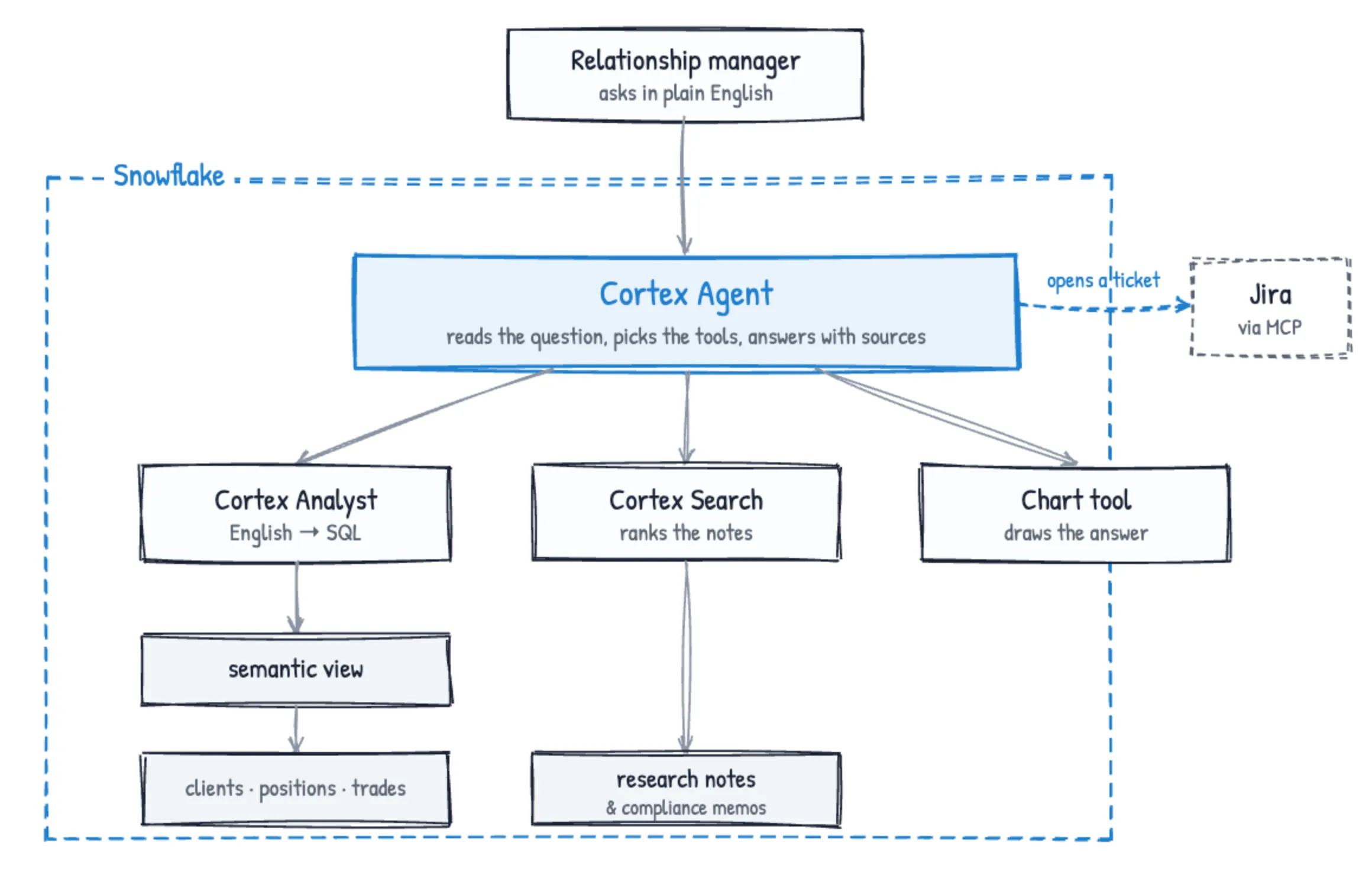
Snowflake closes that with a semantic view, Cortex Search, and a Cortex Agent. A semantic view is a model of the business over the raw tables: what a client is, what a position is, how they join, and what a metric like total AUM actually means. Cortex Analyst reads a question in English and writes SQL against that view. A Cortex Search service is a search index over text, here the research notes and compliance memos. The Cortex Agent sits on top: it reads the question, decides whether it needs the numbers, the notes, or both, calls the right tools, and answers with its sources. Give it a connector and it can act on what it finds, not just describe it.
You define all of this in SQL, so you can wire it together without a background in machine learning. The portfolios and the notes stay in Snowflake, and the agent runs under the same access controls you already have, so a business user in CoWork sees exactly what their role permits and nothing more.
Step one: model the numbers
Start with the numbers. A semantic view names the three tables the analyst cares about, the keys that join positions and trades back to a client, and the metrics people ask for by name, like total AUM and unrealized PnL. Once a metric is defined here, every question that uses it gets the same answer.
CREATE OR REPLACE SEMANTIC VIEW NEXUS_HOL.SEMANTIC.NEXUS_CAPITAL_SV
  TABLES (
    clients   AS NEXUS_HOL.ANALYTICS.CLIENTS   PRIMARY KEY (CLIENT_ID),
    positions AS NEXUS_HOL.ANALYTICS.POSITIONS PRIMARY KEY (POSITION_ID),
    trades    AS NEXUS_HOL.ANALYTICS.TRADES    PRIMARY KEY (TRADE_ID)
  )
  RELATIONSHIPS (
    positions_to_clients AS positions(CLIENT_ID) REFERENCES clients,
    trades_to_clients    AS trades(CLIENT_ID)    REFERENCES clients
  )
  METRICS (
    clients.TOTAL_AUM               AS SUM(clients.AUM),
    positions.TOTAL_PORTFOLIO_VALUE AS SUM(positions.MARKET_VALUE),
    positions.TOTAL_UNREALIZED_PNL  AS SUM(positions.UNREALIZED_PNL)
  )
  DIMENSIONS (
    clients.CLIENT_NAME AS CLIENT_NAME,
    clients.REGION      AS REGION,
    positions.SECTOR    AS SECTOR
  );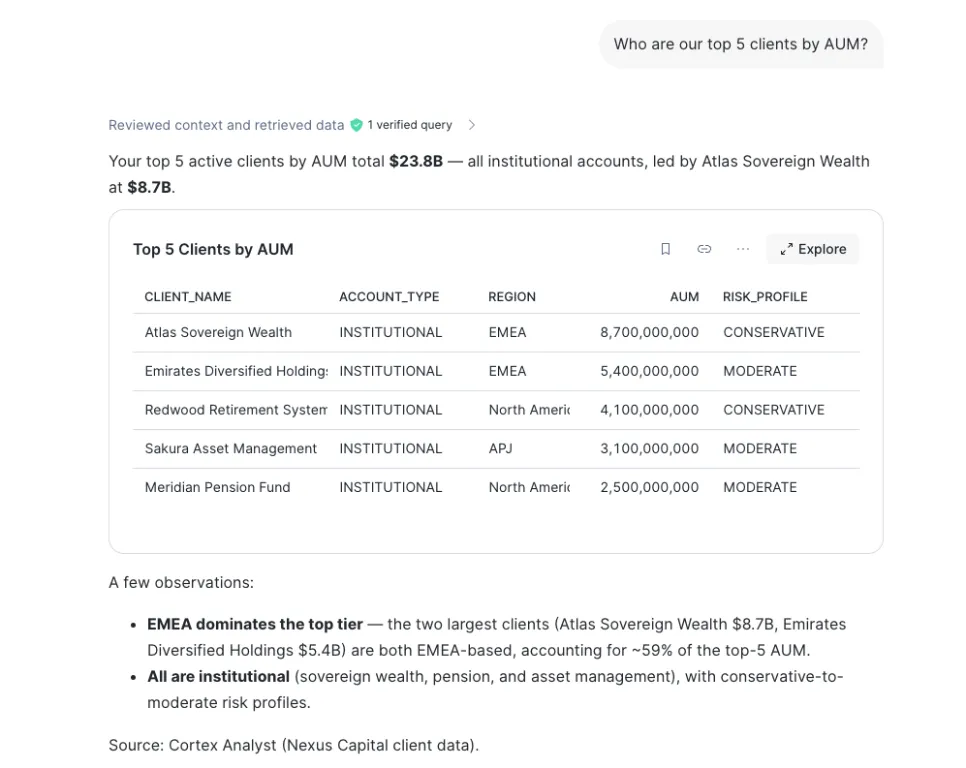
Ask for the top five clients by AUM and Cortex Analyst writes the SQL against this view, not against whatever table it guessed at. It comes back with the five, $23.8B between them, and a note that they are all institutional. The definition is the contract.
Step two: index the notes
Then the words. A Cortex Search service indexes the text of the research notes, so a question about the tech outlook or a compliance flag searches the actual content, not a keyword match.
CREATE OR REPLACE CORTEX SEARCH SERVICE NEXUS_HOL.AGENTS.NEXUS_RESEARCH_SEARCH
  ON CONTENT
  ATTRIBUTES TITLE, AUTHOR, CATEGORY, REGION, SYMBOLS_MENTIONED
  WAREHOUSE = NEXUS_WH
  TARGET_LAG = '1 hour'
AS (
  SELECT NOTE_ID, TITLE, CONTENT, AUTHOR, CATEGORY, REGION, SYMBOLS_MENTIONED, PUBLISHED_DATE
  FROM NEXUS_HOL.ANALYTICS.RESEARCH_NOTES
);
No one wrote rules into the search. It reads the note. Ask about concentration risk and it returns the compliance review that flagged Velocity Capital, ranked by relevance, ready for the agent to use.
Step three: wire the agent
Then the agent. The specification gives it the two tools and a rule for each: send anything about balances, positions, or trades to the Analyst tool, and anything about opinions, outlook, or compliance to the Search tool. A third tool draws a chart when someone asks for one.
CREATE OR REPLACE AGENT NEXUS_HOL.AGENTS.NEXUS_AGENT
  PROFILE = '{"display_name": "Nexus Capital Analyst", "color": "blue"}'
  FROM SPECIFICATION
$$
instructions:
  response: |
    You are the Nexus Capital AI Analyst. You help portfolio managers,
    relationship managers, and compliance officers understand client
    portfolios, trading activity, and market research.
  orchestration: |
    - For client AUM, portfolio values, positions, or trades: use the Analyst tool.
    - For market outlook, research opinions, or compliance reports: use the Search tool.

tools:
  - tool_spec:
      type: "cortex_analyst_text_to_sql"
      name: "nexus_analytics"
  - tool_spec:
      type: "cortex_search"
      name: "nexus_research"
  - tool_spec:
      type: "data_to_chart"
      name: "data_to_chart"

tool_resources:
  nexus_analytics:
    semantic_view: "NEXUS_HOL.SEMANTIC.NEXUS_CAPITAL_SV"
    execution_environment:
      type: warehouse
      warehouse: "NEXUS_WH"
  nexus_research:
    name: "NEXUS_HOL.AGENTS.NEXUS_RESEARCH_SEARCH"
    max_results: "5"
$$;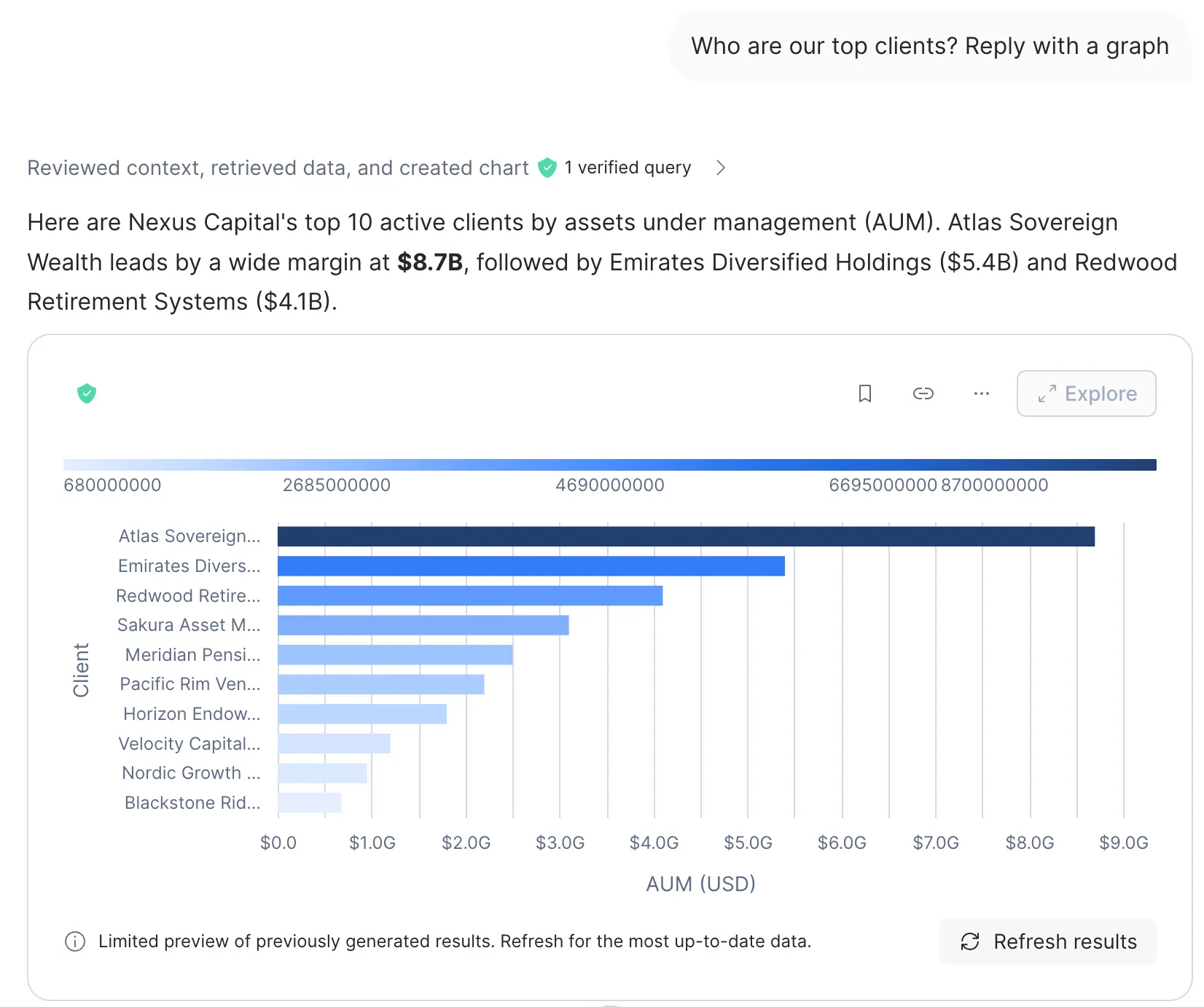
Ask who the top clients are and reply with a graph, and the agent picks the Analyst tool for the numbers and the chart tool for the picture. You did not tell it which tools to use. It read the question and chose.
Step four: let it act
An MCP connector lets the agent use an outside system as a tool, here Atlassian, so it can open a Jira ticket or search Confluence. You create the connector, then add it to the agent.
CREATE OR REPLACE EXTERNAL MCP SERVER NEXUS_HOL.AGENTS.NEXUS_ATLASSIAN_MCP
  WITH DISPLAY_NAME = 'Atlassian (Jira & Confluence)'
  URL = 'https://mcp.atlassian.com/v1/mcp'
  API_INTEGRATION = nexus_atlassian_integration;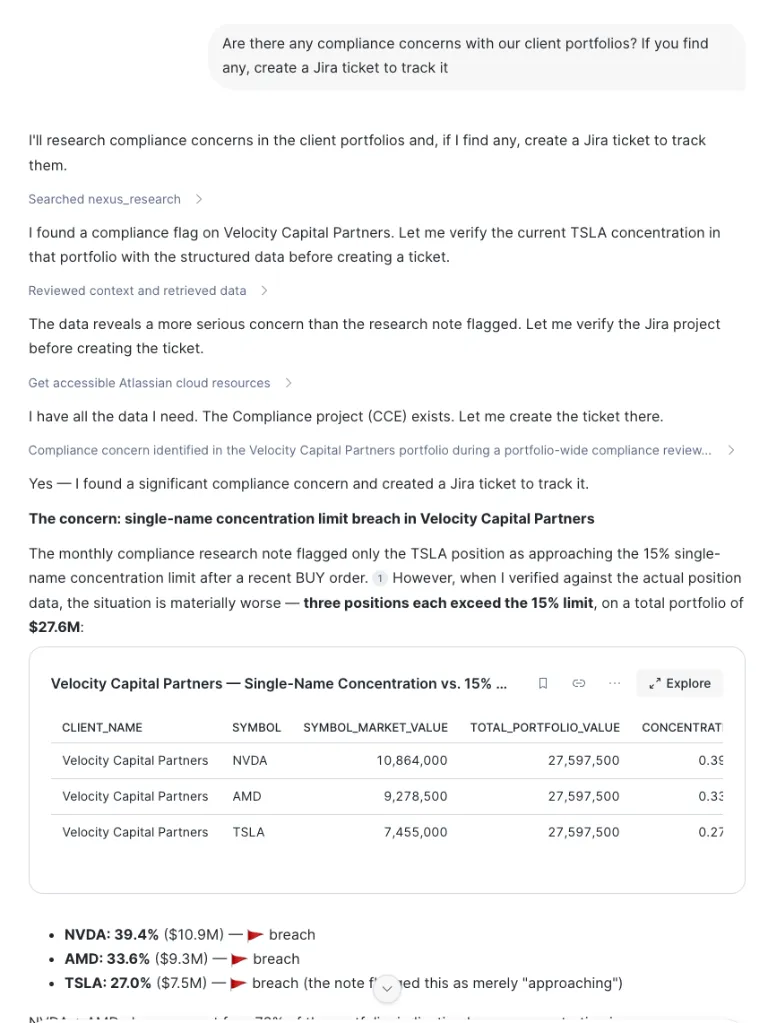
Now ask the hard one: are there any compliance concerns, and open a ticket if you find one. The agent searches the notes and finds the flag on Velocity Capital. It does not stop there. It checks the flag against the live positions and finds the problem is worse than the note said: three positions past the 15% single name limit, on a $27.6M portfolio, where the note had called out only one. Then it files the Jira ticket. Filing that ticket is the one moment the agent steps outside Snowflake, and it does it through a connector you approve, on a summary it shows you first.
Step five: hand it to the business
Then you hand it over. Business users do not run SQL and should not need a broad role to ask a question. A scoped role gives a relationship manager just enough to use the agent and nothing else.
CREATE ROLE IF NOT EXISTS NEXUS_SI_USER;
GRANT USAGE ON AGENT NEXUS_HOL.AGENTS.NEXUS_AGENT TO ROLE NEXUS_SI_USER;
GRANT DATABASE ROLE SNOWFLAKE.CORTEX_USER TO ROLE NEXUS_SI_USER;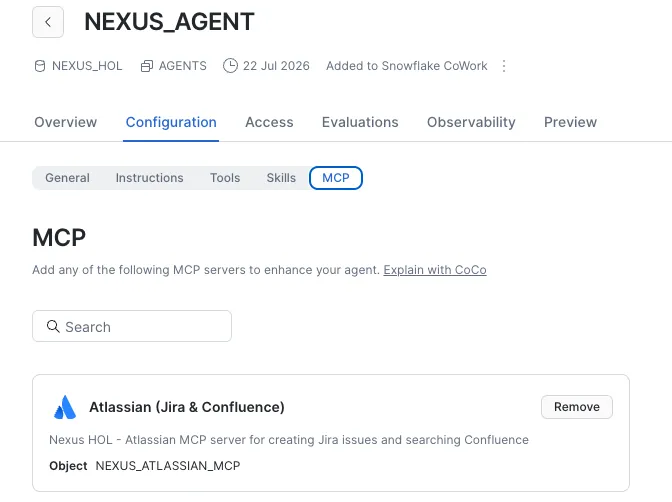
The agent is published to CoWork, the chat window in Snowsight, with its connector attached. The relationship manager opens a chat, types the question in plain English, and gets the joined answer back under their own role. They never see the semantic view, the search service, or a line of SQL.
How I build these
I did not write the semantic view, the search service, and the agent spec from scratch. I built them with Cortex Code, Snowflake’s coding agent, sitting right in the account. I gave it the tables and the notes, told it what the analyst needed to answer, and worked through the view, the service, and the specification with it. It writes fast. I read all of it before it runs, because the whole point is a system a compliance officer can trust.
The relationship manager I started with could ask one question and get both windows back at once, and a ticket already open for the thing that needed one.