
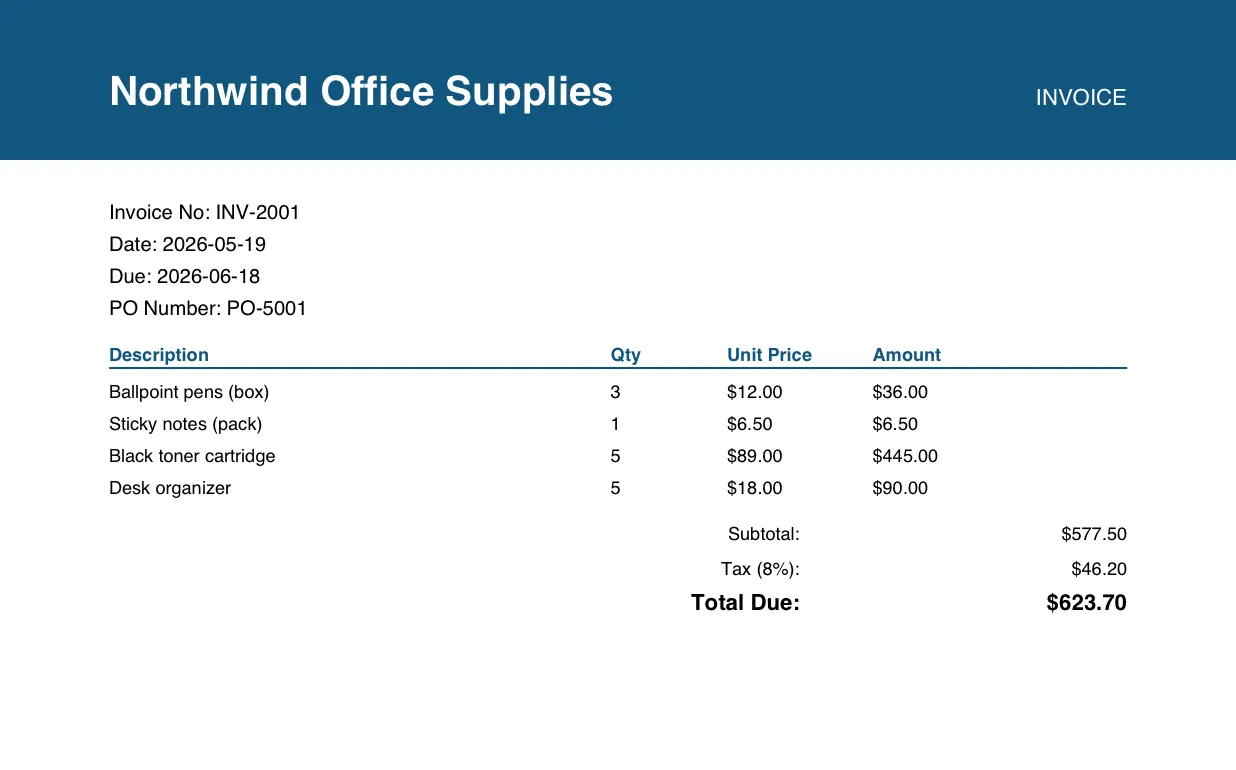
Today I built a pipeline that reads a pile of invoice PDFs and pulls every field out of them, in SQL, with nothing leaving Snowflake.
A few weeks ago I sat with a finance team that had three people working on invoices full time. Not analysing them. Retyping them. Vendor, date, line items, total, copied out of a PDF into a spreadsheet, one file at a time.
They knew it was absurd. They had tried to automate it twice. Both times the thing they built collapsed under its own weight, and they went back to typing.
Three mid level people doing that full time is around half a million a year in salary, spent on copy and paste.
This shows up everywhere. A finance team pulling line items out of invoices. Quant traders who want to read thousands of SEC filings. A support team trying to understand churn from call recordings nobody has time to play back. The answer is sitting right there inside the documents. It just can’t be queried.
The usual workaround
So most teams end up in one of two places. They don’t do it, because it’s too painful. Or they build something convoluted to make it happen: they export the files to blob storage, stand up a Python service they now have to run, wire in an OCR library or a vision API to parse the docs, write chunking logic, push it into a vector database, schedule the whole thing in an orchestrator, add retries for when the rate limits hit. Then a week of security review explaining why the customer contracts are being sent to some outside endpoint. New file type, and they start over.
Take something as ordinary as an invoice, like the one up top. You read it in a second. Vendor, number, dates, line items, a total. To a pipeline, every one of those is a field you have to find, label, and pull out, across hundreds of layouts that never quite match.
That gap, between what you see instantly and what a system has to be taught to see, is the whole problem.
Snowflake closes it with a set of AI functions. They do the parsing and extraction for you, in plain SQL, right where the data already lives. AI_PARSE_DOCUMENT turns a PDF into clean text and layout. AI_EXTRACT pulls named fields out of it. AI_TRANSCRIBE handles audio and video, AI_CLASSIFY labels, AI_SENTIMENT scores, and AI_EMBED with Cortex Search lets you ask questions over the results.
They’re functions you call in a SELECT. You don’t need to be an AI specialist to use them. If you can write basic SQL, you can use them. The files never leave Snowflake, and everything runs under the access controls you already have. That quietly answers the question the finance team kept getting stuck on: am I even allowed to send this to a model.
Step one: parse the files
Start with parsing. AI_PARSE_DOCUMENT reads every file in the stage and turns it into clean text. LAYOUT mode keeps the tables intact, so a grid of line items doesn’t collapse into a wall of words.
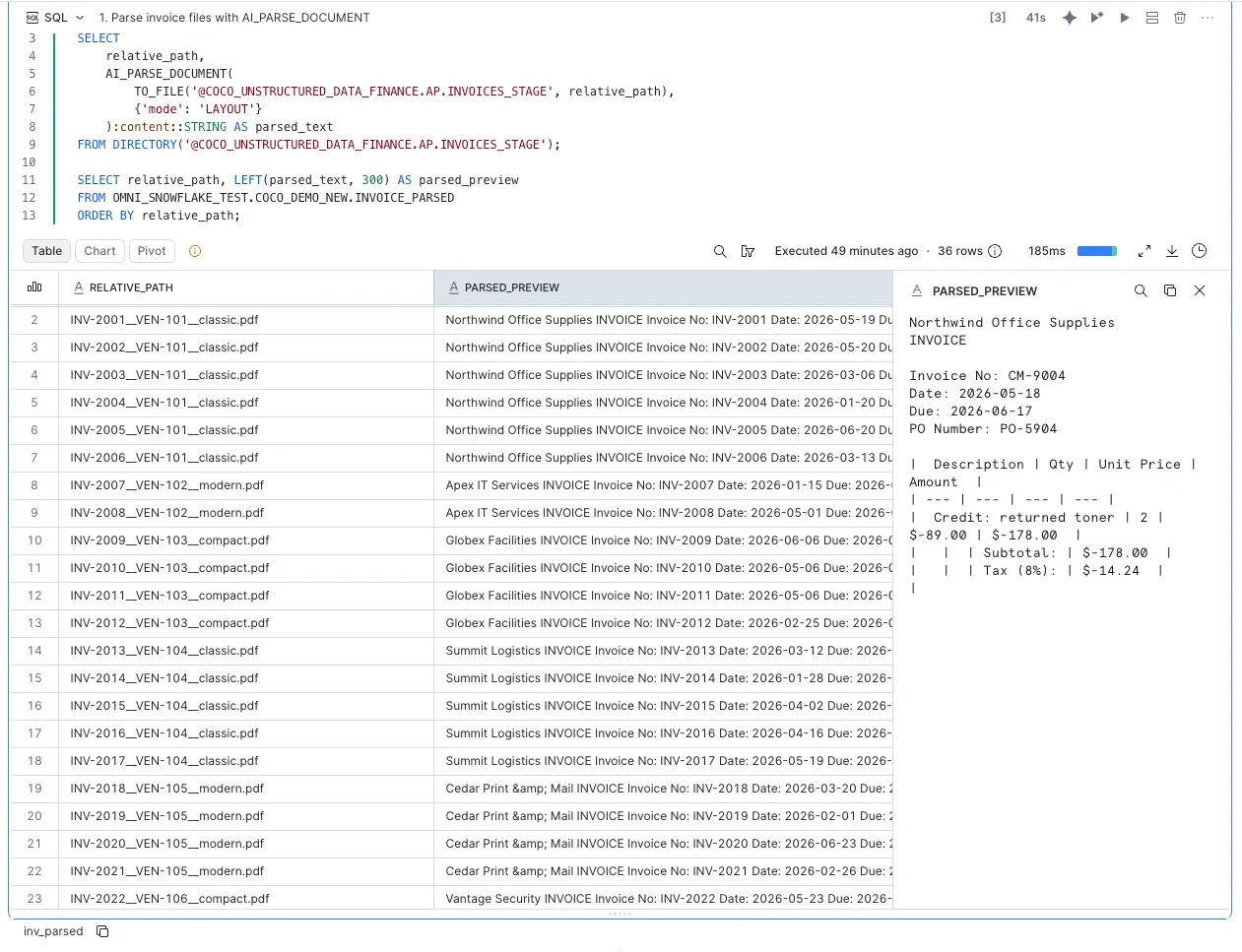
That’s the whole parse step. One SELECT over a folder of PDFs. On the right you can see the result: the invoice came back as readable text, total and all. No OCR library, no Python service, nothing leaving Snowflake.
Step two: extract the fields
Then you extract the fields you actually want. Named in a single call, returned as columns.
SELECT AI_EXTRACT(file, ['vendor', 'invoice_date', 'total_amount']) AS fields
FROM my_invoices;
You don’t write a template or per vendor rules, and there’s no service to keep running. A folder of messy PDFs becomes a table you can query.
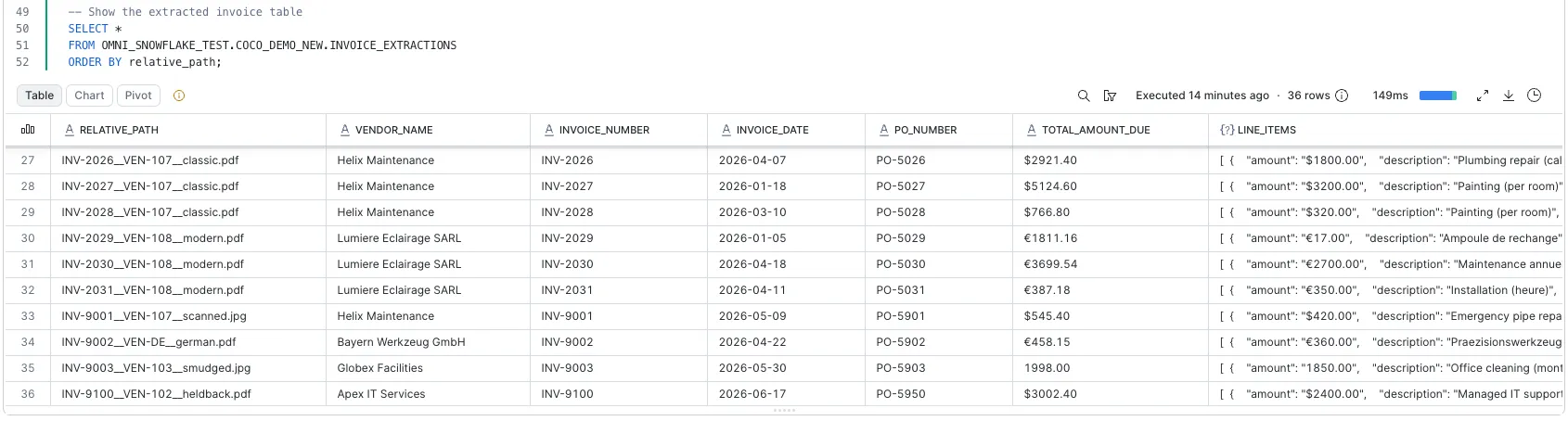
One row per invoice, with vendor, number, date, PO, total, and the line items as structured JSON. The messy inputs come through fine too, like a scanned .jpg, a smudged file, or a German invoice in euros. From here it’s just a table you can query.
How I build these
The tool I use to build these is Cortex Code, Snowflake’s coding agent. I point it at the folder, tell it what I want out of it, and it writes the SQL with me: staging the files, choosing the functions, building the table. I still read every line it produces. I just don’t start from an empty file anymore.
The finance team I started with could replace their whole retyping process with a few queries like these.
See it live
Next week I’m running a live demo on building these pipelines with Cortex Code. We’ll go end to end and build three from scratch: invoice processing, call center audio analytics, and contract intelligence you can ask questions of in plain English. I’m running this on June 30th. That’s it.